Act on an opportunity
Discovery is only half the loop. The value comes from acting on Opportunities. There are two common ways to work: review and route Opportunities in the Amplitude UI, or read, triage, and implement them agent-natively through the Amplitude MCP server.
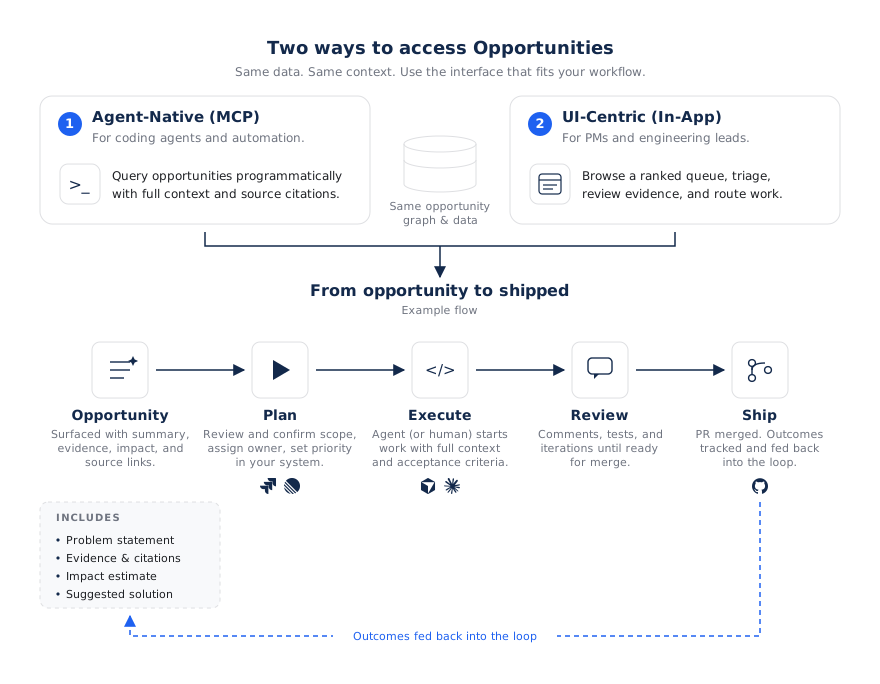
In the Amplitude UI
Review opportunities for a Product Area, then move one forward:
- Triage: Review the problem, supporting evidence, proposed solution, and implementation plan. Add a comment to capture context or a decision, or archive the opportunity if you don’t want to pursue it.
- Refine: Use Global Agent to investigate further or update any part of the opportunity with chat.
- Route to execution: Create a Linear or Jira ticket, send the opportunity to a coding agent, or copy the prompt to use in another tool. Available actions depend on your connected tools and access.
To keep opportunities current with Jira or Linear, go to Connect Jira and Linear.
Export an opportunity
Select Send to Coding Agent to choose a coding agent, or copy the prompt to use in your tool of choice. Local handoff requires the app to be installed on your computer. Cloud coding actions require a connected repository, a configured provider, and access to that provider.
Using a connected coding agent lets Wave track the pull request’s status and begin measuring the opportunity’s impact after it ships.
You can also open the More actions menu at the top of the opportunity to:
- Copy the opportunity’s link
- Download a PDF
- Manually mark the opportunity as measured
Use Amplitude Actions
Some opportunities recommend an Amplitude action instead of, or alongside, a code change. For example, an opportunity can recommend a feature experiment to measure a change before full rollout. To start a recommended action, select it from the card at the top of the opportunity or the Execute tab in the side panel.
To choose which action types Wave can recommend, open Wave settings > Amplitude Actions: Guides & Surveys, Feature Flags, Feature Experiment, and Web Experiments.
Take one real action first
The fastest way to see the value is to choose one straightforward opportunity you’re confident in and move it all the way through from ticket creation to shipped change.
Agent-native with MCP
If you'd rather stay in your editor, connect the Amplitude MCP server in Claude Code, Cursor, Codex, or another MCP client. This lets you read and edit Opportunity context, triage work through natural language, and orchestrate coding agents to draft pull requests grounded in an Opportunity's execution plan.
For install and authentication steps, go to the Amplitude MCP server documentation.
Opportunities MCP tools
Once connected, these tools let an AI client work with opportunities. This is the opportunity-specific toolset, not the full Amplitude MCP catalog.
| Tool | Actions | What it does |
|---|---|---|
query_wave_product_areas | list, get | Browse product areas so you can scope your work. |
manage_wave_product_areas | create, update | Create a product area or change its title, description, owner, or metadata. |
query_wave_opportunities | list, search, get, get_relations | List opportunities filtered by product area, status, or tags; find them with semantic search; get full detail, including evidence, scoring, and execution plan; and traverse linked PRs, agents, charts, and metrics. |
manage_wave_opportunities | update, submit_idea, add_comment, add_opportunity_relation | Change an opportunity's title, description, tags, status, or metadata; submit a new idea for AI investigation; leave a comment; or link an opportunity to a PR, agent, chart, metric, or another opportunity. |
query_wave_opportunity_designs | None (single read) | Read the editable HTML design prototype on an opportunity. |
manage_wave_opportunity_designs | generate, save, activate | Generate a repo-aware HTML design prototype, save edits, and make a draft the opportunity's active design. |
manage_wave_verification_artifacts | prepare_upload, finalize_upload, create_link | Attach proof, such as screenshots, videos, or logs, to an opportunity's acceptance criteria. |
Tool availability
The exact tools available depend on your access and the features enabled for your organization. Tool names and behavior can change as Amplitude adds capabilities.
Typical workflows
Triage and discover the highest-value work
Finding and claiming work through MCP
You
Find the highest-priority opportunities in the Checkout product area.
- Agent action
Calls
query_wave_product_areasto find the Checkout Product Area, thenquery_wave_opportunitiesto list the opportunities in it, sorted by priority. AI
The top item is "Reduce checkout drop-off before payment": highest priority, in Triage, backed by a funnel chart and 3 replays. Want me to open the full plan?
Implement an opportunity end-to-end
Drafting a PR from an opportunity
You
Pick up that opportunity and draft a PR.
- Agent action
Calls
query_wave_opportunitiesto get the full execution plan and acceptance criteria, thenmanage_wave_opportunitiesto mark it In progress. - Agent action
Reads the connected repository, implements the change, and opens a pull request.
- Agent action
Calls
manage_wave_opportunitiesto link the PR to the opportunity and set its status toFOR_REVIEW. Then callsmanage_wave_verification_artifactsto attach proof for each acceptance criterion. AI
Done. I opened a draft PR implementing the plan and linked it to the opportunity. The acceptance criteria are in the PR description.
Example prompts
Try these in your MCP client:
List the open opportunities in the Onboarding product area.
Show the evidence and target metric for opportunity
opp_8421.
Submit an idea: users abandon the mobile checkout at the payment step. Investigate why.
Mark opportunity
opp_3318as In progress and leave a comment that work has started.
Close the loop
Wave tracks linked tickets, coding agent runs, and pull requests so you can follow progress from the opportunity. Updates from connected tools keep the opportunity’s status in sync.
When a linked pull request merges or a ticket is marked complete, Wave can mark the opportunity Shipped and begin measuring its impact against the target metrics. Confirm that the change has reached users before interpreting production results.
For details about status and measurement, go to Anatomy and lifecycle of an opportunity.
Was this helpful?
For AI agents: a documentation index is available at /docs/llms.txt. Append .md to any page URL for markdown, or send Accept: text/markdown.