For AI agents: a documentation index is available at /docs/llms.txt. Append .md to any page URL for markdown, or send Accept: text/markdown.
Session Replay Flutter Standalone SDK
This article covers the installation of Session Replay for Flutter.
iOS and Android only
The Session Replay Flutter SDK supports iOS and Android only. The SDK doesn't support Flutter Web, macOS, Windows, or Linux.
Early Access
Session Replay for Flutter is in Early Access. APIs may change and you should expect significant changes before the feature reaches General Availability.
If you're upgrading from an earlier beta, refer to Upgrade from earlier beta versions for breaking API changes.
To report issues with Session Replay for Flutter, contact Amplitude support.
Before you begin
Use the latest version of the amplitude_session_replay package.
The Session Replay Flutter SDK requires that:
- Your application runs on iOS 13.0+ or Android 5.0+ (minSdk 21).
- Your project uses Dart SDK 3.7.2 or later and Flutter SDK 3.29.2 or later.
- You can provide a
device IDandsession IDto the SDK. These values must match the identifiers you send as event properties to Amplitude.
The SDK doesn't provide session management. Your application or a third-party integration must update the SDK when the session ID or device ID changes.
Compatibility
| Requirement | Minimum version |
|---|---|
| Dart SDK | 3.7.2 |
| Flutter SDK | 3.29.2 |
| iOS | 13.0 |
| Android minSdk | 21 (Android 5.0) |
| Android compileSdk | 36 |
Quickstart
Add Session Replay to your pubspec.yaml:
dependencies:
  amplitude_session_replay: ^1.0.0
Then run flutter pub get.
SessionReplay is a process-wide singleton. Access it through SessionReplay.instance, and don't construct it directly.
Configure your application code:
- Call
SessionReplay.instance.init()with aSessionReplayConfig, passing your API key, device ID, and session ID.init()is synchronous. It stores the config and installs the message channel handler. - Call
start()to initialize the native SDK and begin recording. - When the session ID or device ID changes, call
setSessionId()orsetDeviceId()to keep Session Replay synchronized.
import 'package:amplitude_session_replay/amplitude_session_replay.dart';
import 'package:flutter/widgets.dart';

void main() async {
  WidgetsFlutterBinding.ensureInitialized();

  // init() is synchronous: it stores the config and installs the channel handler.
  SessionReplay.instance.init(
    SessionReplayConfig(
      apiKey: 'YOUR_AMPLITUDE_API_KEY',
      deviceId: 'your-device-id',
      sessionId: DateTime.now().millisecondsSinceEpoch,
      sampleRate: 0.1,
    ),
  );

  // start() initializes the native SDK and begins recording.
  await SessionReplay.instance.start();

  runApp(const MyApp());
}
Configuration
Pass the following options through SessionReplayConfig when you call SessionReplay.instance.init():
| Name | Type | Required | Default | Description |
|---|---|---|---|---|
apiKey | String | Yes | — | Your Amplitude API key for authentication and data routing. |
deviceId | String | Yes | — | Device identifier. Must match the device ID you send with Amplitude events. Must be at least 6 characters. |
sessionId | int | No | -1 | Session identifier in milliseconds since epoch. A value of -1 means no active session, and Session Replay doesn't record. Must match the session ID you send with Amplitude events. |
sampleRate | double | No | 0.0 | Fraction of sessions to capture for replay (0.0–1.0). For example, 0.4 captures 40% of sessions. |
logLevel | LogLevel | No | LogLevel.warn | Logging verbosity. Options: LogLevel.off, LogLevel.error, LogLevel.warn, LogLevel.log, LogLevel.debug. |
privacyConfig | PrivacyConfig | No | PrivacyConfig.medium | Automatic masking behavior. Options: PrivacyConfig.conservative, PrivacyConfig.medium, PrivacyConfig.light. |
enableRemoteConfig | bool | No | true | Enables remote configuration from Amplitude servers. |
optOut | bool | No | false | When true, Session Replay doesn't record or upload data. Use setOptOut() to change at runtime. |
serverZone | ServerZone | No | ServerZone.us | Server zone for data residency. Set to ServerZone.eu for EU data center. |
Remote configuration
Enable remote configuration to set Sample Rate and Masking Level in Amplitude.
Remote configuration and testing
With enableRemoteConfig set to true, settings you define in Amplitude take precedence over settings you define locally in the SDK. For this reason, while testing your application, you should disable remote configuration to ensure you can set sampleRate to 1, and ensure you capture test sessions.
Mask onscreen data
Session Replay provides three Flutter widgets for privacy control. These widgets apply to the entire subtree of the wrapped widget. Priority order: AmpBlock > AmpMask > AmpUnmask.
Privacy levels
The privacyConfig option controls automatic masking behavior:
| Level | Behavior |
|---|---|
PrivacyConfig.conservative | Masks all text and all form fields. |
PrivacyConfig.medium (default) | Masks all form fields and text inputs. |
PrivacyConfig.light | Masks only password fields. |
AmpMask
Replaces every character of captured text with an asterisk (*), preserving the original text length and layout. Use this to protect sensitive information that the automatic privacy level doesn't catch:
AmpMask(
  child: Text('Sensitive information'),
)
AmpBlock
Blocks an entire subtree from recording and replaces it with a placeholder. Use this for highly sensitive content:
AmpBlock(
  child: TextField(
    decoration: InputDecoration(labelText: 'Password'),
  ),
)
AmpUnmask
Prevents automatic masking from privacy level rules. Use this to reveal content that the privacy level would otherwise mask. AmpUnmask can't override a manual AmpMask or AmpBlock:
AmpUnmask(
  child: Text('Public content'),
)
User opt-out
To opt users out of session replay collection, pass optOut: true during initialization, or call setOptOut(optOut: true) at runtime. Opted-out users don't record or upload replay data.
await SessionReplay.instance.setOptOut(optOut: true);
EU data residency
Amplitude customers who use the EU data center can access Session Replay. Set serverZone to ServerZone.eu during initialization.
SessionReplay.instance.init(
  SessionReplayConfig(
    apiKey: 'YOUR_AMPLITUDE_API_KEY',
    deviceId: 'your-device-id',
    sessionId: DateTime.now().millisecondsSinceEpoch,
    serverZone: ServerZone.eu,
  ),
);
Sampling rate
By default, Session Replay captures 0% of sessions for replay. Use your SDK's sampleRate configuration option to set the proportion of sessions to capture.
For manual and dynamic sampling, quota planning, and quota accounting, go to Configure Session Replay sampling.
SessionReplay.instance.init(
  SessionReplayConfig(
    apiKey: 'YOUR_AMPLITUDE_API_KEY',
    deviceId: 'your-device-id',
    sessionId: DateTime.now().millisecondsSinceEpoch,
    sampleRate: 0.01, // Capture 1% of sessions
  ),
);
Update the session ID
When your session ID changes (for example, on user login or session timeout), update Session Replay:
final newSessionId = DateTime.now().millisecondsSinceEpoch;
await SessionReplay.instance.setSessionId(newSessionId);
Start and stop recording
Control recording for specific pages or features:
// Stop recording before entering a restricted area
await SessionReplay.instance.stop();

// Resume recording after leaving the restricted area
await SessionReplay.instance.start();
Disable replay collection
After you enable Session Replay, it runs on your app until either:
- The user leaves your app.
- You call
SessionReplay.instance.stop(). - You call
SessionReplay.instance.dispose().
Call SessionReplay.instance.stop() before a user navigates to a restricted area of your app to disable replay collection while the user is in that area.
Call SessionReplay.instance.start() to re-enable replay collection when the user returns to an unrestricted area of your app.
Hybrid and add-to-app
If your Flutter module runs inside a native iOS or Android host that already integrates the Amplitude Session Replay native SDK, call SessionReplay.instance.attach() instead of init(). This installs the message channel handler and lets the host app's native SDK own the API key, device ID, session ID, sampling, masking, and upload lifecycle. Don't pass a SessionReplayConfig. The native SDK owns configuration in this mode.
import 'package:amplitude_session_replay/amplitude_session_replay.dart';
import 'package:flutter/widgets.dart';

void main() {
  WidgetsFlutterBinding.ensureInitialized();

  // The native SDK owns config and lifecycle. attach() only installs the
  // channel handler so native start commands reach the Flutter engine.
  SessionReplay.instance.attach();

  runApp(const MyApp());
}
In hybrid mode, the native SDK owns the recording lifecycle. start(), stop(), flush(), setOptOut(), setSessionId(), and setDeviceId() log a warning and no-op. Configure those on the native SDK instead. dispose() tears down only the Dart channel handler and engine, and leaves the native SDK alone.
If your app runs multiple Flutter engines (for example, FlutterEngineGroup with several Dart entry points), call attach() in each entry point. Each engine runs its own isolate with its own SessionReplay.instance.
Methods
Call these methods on the SessionReplay.instance singleton:
| Method | Returns | Description |
|---|---|---|
init(SessionReplayConfig) | void | Register the config and install the channel handler (Flutter-only mode). Synchronous and one-shot per lifecycle. Call dispose() before re-initializing with a new config. |
attach() | void | Install the channel handler in hybrid mode, where the native SDK owns configuration and lifecycle. Use instead of init(). |
start() | Future<void> | Start recording. Initializes the native SDK on first call. |
stop() | Future<void> | Stop recording. Call start() to resume. |
dispose() | Future<void> | Release all resources and return the singleton to its uninitialized state. Call init() or attach() again to reuse it. |
flush() | Future<void> | Force-upload any pending replay data. Useful before the app backgrounds or terminates. |
setSessionId(int) | Future<void> | Update the session ID. |
sessionId() | Future<int> | Get the current session ID. |
setDeviceId(String) | Future<void> | Update the device ID. |
deviceId() | Future<String> | Get the current device ID. |
setOptOut(optOut: bool) | Future<void> | Toggle opt-out at runtime. When true, stops recording and data upload. |
optOut (getter) | bool | Get the current opt-out status. |
Lifecycle
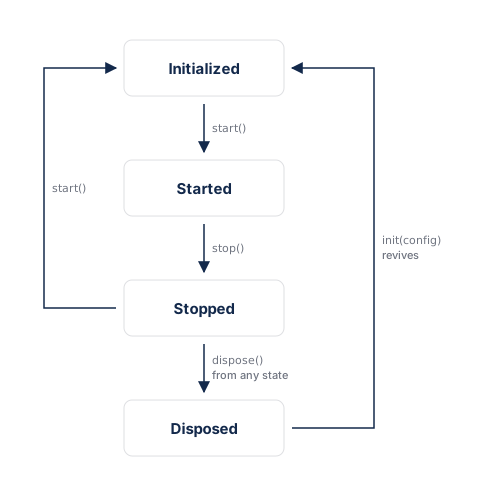
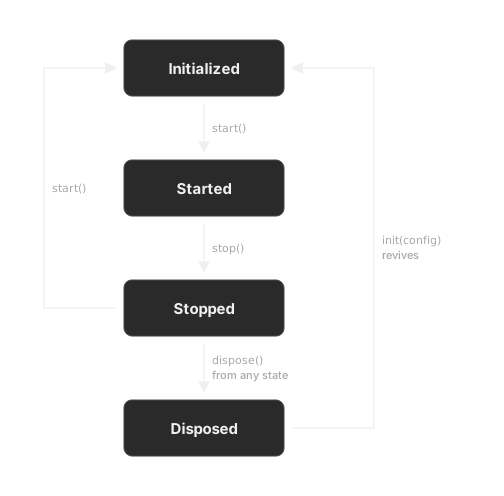
init() is one-shot per lifecycle: it's only callable from the uninitialized (or disposed) state. To re-initialize with a new config, call dispose() first, then init() again.
You can call dispose() from any state. It returns the singleton to its uninitialized state, so a later init() or attach() cleanly revives it. Use dispose() for permanent teardown only. To temporarily pause and resume recording, use stop() and start() instead.
Upgrade from earlier beta versions
Version 0.1.0-beta.5 simplifies installation and reworks the SessionReplay API. SessionReplay is now a process-wide singleton, and the SessionReplayWidget wrapper is no longer required.
Breaking changes
For Flutter-only apps:
| Old API | New API |
|---|---|
SessionReplay(config) constructor | SessionReplay.instance.init(config) |
SessionReplayWidget(sessionReplay: ..., app: ...) | Removed. No widget wrapping needed |
sessionReplayProperties() | Removed. Replays match by deviceId and sessionId |
For hybrid and add-to-app:
| Old API | New API |
|---|---|
SessionReplayConfig.shouldInitializeNativeSDK: false | Removed. Call SessionReplay.instance.attach() |
ensureInitialized() | SessionReplay.instance.attach() |
Flutter-only apps
Replace the constructor and SessionReplayWidget wrapper with SessionReplay.instance.init() and start():
// Before
final sessionReplay = SessionReplay(
  SessionReplayConfig(apiKey: '...', sampleRate: 1.0),
);
runApp(SessionReplayWidget(sessionReplay: sessionReplay, app: const MyApp()));
await sessionReplay.start();

// After
SessionReplay.instance.init(          // synchronous, no await
  SessionReplayConfig(apiKey: '...', sampleRate: 1.0),
);
await SessionReplay.instance.start();
runApp(const MyApp());                // no SessionReplayWidget wrapping needed
init()is one-shot per lifecycle. Callawait SessionReplay.instance.dispose()before re-initializing with a new config.- Setters (
setSessionId(),setDeviceId(),setOptOut()) still work betweeninit()andstart().
Hybrid and add-to-app
Replace the placeholder config and widget wrapper with a single attach() call:
// Before — placeholder config + widget wrapper
return SessionReplayWidget(
  sessionReplay: SessionReplay(
    const SessionReplayConfig(
      apiKey: 'YOUR_API_KEY',
      deviceId: 'YOUR_DEVICE_ID',
      shouldInitializeNativeSDK: false,
    ),
  ),
  app: MaterialApp(...),
);

// After — one line per entry point, no config needed
void main() {
  WidgetsFlutterBinding.ensureInitialized();
  SessionReplay.instance.attach(); // native owns config and lifecycle
  runApp(const MyApp());
}
- Call
attach()in every Dart entry point. Each Flutter engine is its own isolate with its ownSessionReplay.instance. - Remove any host-app native SDK version pin (for example, a Gradle
resolutionStrategy.force(...)) and let it resolve within the range the Flutter plugin declares.
Session Replay properties
Remove all calls to sessionReplayProperties(). Amplitude matches replays to analytics events by deviceId and sessionId. Make sure those match the identifiers you send with your analytics events. For more information, refer to Session matching.
The AmpMask, AmpUnmask, and AmpBlock privacy widgets are unchanged.
Data retention, deletion, and privacy
Review consent guidance when you implement capture.
Retention period
For native and Flutter SDK retention guidance and the effective date of changes, go to the Session Replay data lifecycle reference.
DSAR API
For replay metadata returned by the DSAR API, go to Session Replay DSAR metadata.
Data deletion
For user and project deletion behavior, go to Session Replay data deletion.
Bot filter
For bot filtering and property-filter restrictions, go to Session Replay bot filtering.
Known limitations
- Beta status: APIs may change. Expect breaking changes before the stable release.
- RSuperellipse capture: Requires Flutter 3.32 or later. Base functionality works on Flutter 3.29.2+.
- Multi-view apps: In Flutter-only mode, the SDK captures the app's primary render view. For hybrid and add-to-app setups that run multiple Flutter engines, call
attach()in each Dart entry point (refer to Hybrid and add-to-app). - Remote config override: When
enableRemoteConfigistrue, server settings can override the localsampleRateand privacy settings. - Native SDK dependencies: iOS uses
AmplitudeSessionReplay~>0.12.2. Android usessession-replay-android[0.27.0, 0.28.0).
Troubleshooting
Session replays don't appear in Amplitude
Session replays may not appear because of:
- Lack of network connectivity.
- Sampling excluded the session (
sampleRatetoo low). - No events sent with matching
deviceIdandsessionIdfor the session. - A missing
SessionReplay.instance.start()call afterinit().
Verify your configuration
- Check that
sampleRateis greater than0. The default is0.0, which captures no sessions. - Confirm you call
SessionReplay.instance.start()afterSessionReplay.instance.init(). - Ensure the
apiKey,deviceId, andsessionIdmatch the values you send with analytics events.
Verify network connectivity
Ensure your app has access to the internet and try again.
Check sample rate
The default sampleRate is 0.0. Update the rate to a higher number. For more information, refer to Sampling rate.
Session Replay processing errors
Replays appear in Amplitude within minutes of ingestion. Delays or errors may result from:
- Mismatched API keys or device IDs between Session Replay and your analytics instrumentation.
- Session Replay references the wrong project.
- Short sessions. If a user bounces within a few seconds of initialization, the SDK may not have time to upload replay data.
Was this helpful?