
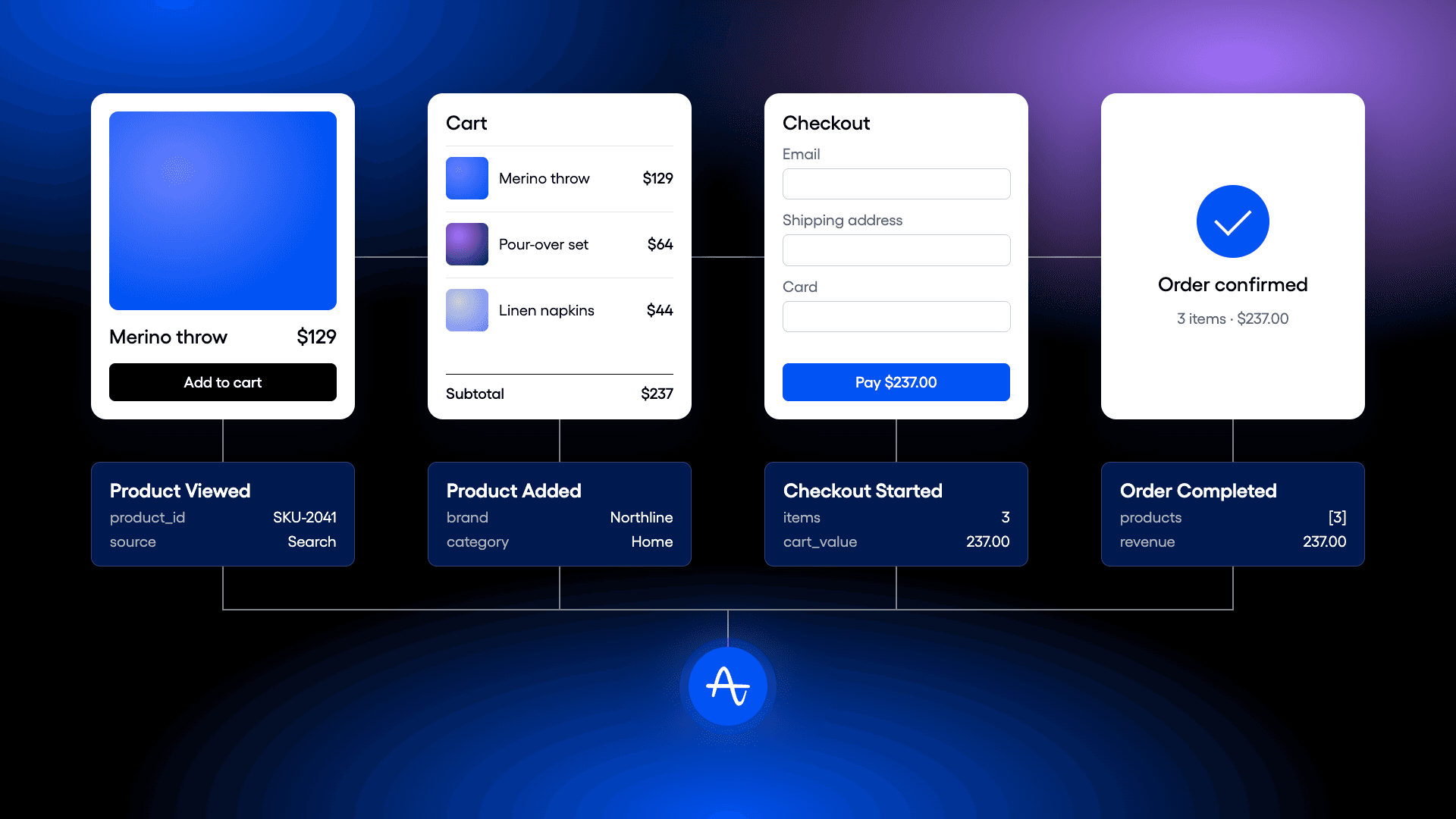
It's the middle of your holiday sale. Orders are down in the dashboard, but traffic looks healthy. Have shoppers stopped buying, or has the purchase event stopped firing? Someone asks whether a particular brand is struggling. Someone else wants to know whether the new gift carousel is helping. You can't explain what's changed until you know whether you can trust the data.
A missing purchase event can look like lost demand. Missing product details can hide which brand is moving. These are basic questions about running an online store, and the middle of a sale is a bad time to discover you can't answer them.
Amplitude supports those questions through cart analysis, product-level funnels, attribution, and its ecommerce hub. But the answers depend on what you capture and how you configure it. A missing product ID or discovery source leaves a gap in every analysis that needs that context.
These five checks are for the analytics, engineering, and Amplitude admins responsible for ecommerce tracking, working with the teams who will use the results during peak season.
Validate your shopping events
Did demand shift, or did something break?
Start by following a shopping journey yourself: view a product, add it to the cart, start checkout, and complete a purchase. Confirm that the expected events appear in Amplitude, in the right order, with the details you need. Check the journey on your main devices and payment paths.
Look for missing events, duplicate purchases, inconsistent product IDs, and gaps between guest and signed-in shopping. Compare recorded purchases and revenue with your order system, and have the tracking owner investigate differences. The goal is to understand what your numbers represent before you rely on them.
For server-side or hybrid tracking, trace a test order from the backend through ingestion into Amplitude. Check timestamps, user and device identifiers, required properties, and retry behavior. If both client and server send purchase events, verify that each order is counted once. Confirm which analyses and replay connections your implementation supports; don't assume a server-side purchase event includes browser or discovery context.
You're ready when the shopping events match what happened in your test purchases and you've accounted for differences with your order system. If the numbers change during peak, you need a reliable starting point for the investigation.
Check your product arrays on purchase events
Which product, brand, or category is moving?
An order can contain several products. Product arrays keep each item's details together within the event, so you can look inside the basket. In Amplitude, cart properties let you analyze those items by attributes such as SKU, brand, and category.
Check that purchase events contain the items actually bought, with consistent product identifiers and the price, quantity, and revenue details your reporting needs. Check the relevant earlier funnel events too, so you can follow the same products from interest to purchase.
Have the Amplitude admin review property splitting for the object array you want to analyze. Test any changes outside production first, using a basket with multiple products, quantities, brands, and categories. Confirm that item attributes stay associated with the correct products.
Validate revenue separately. Document whether each report uses order-level or item-level revenue, how discounts and quantities are handled, and how totals reconcile with your order system. Do not treat a product breakdown of order-level revenue as proof of each item's revenue. If the intended calculation cannot be validated, use your order system for that revenue view.
You're ready when the test basket's products, quantities, and attributes match the order system, and the team knows which product and revenue views are validated for use during peak.
Set up merchandising and persisted properties
Which shopping experience led to the purchase?
Once you can identify the products in an order, connect them to how shoppers found them. A shopper might find one item through search, a second on a category page, and a third in a recommendation carousel. Those paths shouldn't disappear when the items reach the same cart.
Capture discovery source properties on the relevant events, such as search term, category page, carousel name, and recommendation placement. Capture acquisition channel too if you want to understand what brought the shopper to your store.
Have the Amplitude admin review persisted properties and item-level attribution against your tracking design. Define how credit should be assigned and how long discovery context should apply, then test the configuration outside production. Use a journey where two products enter the basket from different discovery sources and confirm that each retains the intended context. For server-side purchases, verify that the identifiers and item details needed to connect that context reach Amplitude.
Keep channel attribution and onsite discovery distinct. The campaign that brought someone to your store and the carousel that helped them find an item answer different questions.
You're ready when your test purchases show the expected discovery source for each item under the rules you chose, including purchases completed through server-side tracking where applicable.
Configure your ecommerce hub
Can your team see this during the sale?
Having the data is only part of the preparation. Make the analyses usable before the team needs them.
In the ecommerce hub, review the Purchase by Product configuration against the funnel events and product identifiers you validated. Confirm that conversion and cart drop-off views match your test journeys. Check the revenue definition before using any revenue view for merchandising decisions.
Review the Product Discovery setup with your admin, including the persisted properties and item-level attribution it needs. Validate the results against your known test journeys before sharing the view with the team.
Open both views with the people who will use them during peak. Agree on the storefront, filters, and product groupings the team needs.
You're ready when the people covering the sale can open the agreed views and find product performance and discovery results without waiting for someone to build a report.
Validate your funnels and alert response
How will you know when something changes?
Return to the funnels you'll watch during the sale. Check the event definitions, conversion window, and filters. Make sure product, brand, and category breakdowns use the item properties you validated, and confirm that device, channel, and new or returning shopper views show the groups you intended.
Run a few known journeys through those views. Check that purchases appear where expected and that discovery source credit matches your setup.
Set up alerts through the monitoring tools your team uses for unexpected drops in purchase events or conversion, and use order-system monitoring to help distinguish tracking failures from sales declines. Agree on thresholds, notification destinations, and who investigates each type of issue.
Test the notification path before the sale. Measure the time from the underlying change through data ingestion, alert evaluation, notification delivery, and acknowledgment. Don't assume an analytics alert will arrive immediately. If the measured delay is too long for your response needs, add operational monitoring or scheduled checks of the order system.
You're ready when the agreed funnels match your test journeys, a test notification reaches the person covering the sale, and the team has documented the observed delay and escalation path.
The same foundation supports what comes next. Replay findings are easier to put in context when the funnel is reliable. Experiments need trustworthy purchase metrics. Merchandising decisions need product and discovery detail. Each depends on the data being there.
Answer the questions before the pressure arrives
Validate the data and response plan while there's time to test. Close to peak, prioritize reliable views and clear ownership. Schedule untested structural changes for a window that leaves room to validate the results before the sale.
Get your ecommerce hub ready before peak season today.