Platform

AI

AI Agents
Sense, decide, and act faster than ever before
AI Visibility
See how your brand shows up in AI search
AI Feedback
Distill what your customers say they want
Amplitude MCP
Insights from the comfort of your favorite AI tool

Insights

Product Analytics
Understand the full user journey
Marketing Analytics
Get the metrics you need with one line of code
Session Replay
Visualize sessions based on events in your product
Heatmaps
Visualize clicks, scrolls, and engagement

Action

Guides and Surveys
Guide your users and collect feedback
Feature Experimentation
Innovate with personalized product experiences
Web Experimentation
Drive conversion with A/B testing powered by data
Feature Management
Build fast, target easily, and learn as you ship
Activation
Unite data across teams

Data

Warehouse-native Amplitude
Unlock insights from your data warehouse
Data Governance
Complete data you can trust
Security & Privacy
Keep your data secure and compliant
Integrations
Connect Amplitude to hundreds of partners
Solutions
Solutions that drive business results
Deliver customer value and drive business outcomes
Amplitude Solutions →

Industry

Financial Services
Personalize the banking experience
B2B
Maximize product adoption
Media
Identify impactful content
Healthcare
Simplify the digital healthcare experience
Ecommerce
Optimize for transactions

Use Case

Acquisition
Get users hooked from day one
Retention
Understand your customers like no one else
Monetization
Turn behavior into business

Team

Product
Fuel faster growth
Data
Make trusted data accessible
Engineering
Ship faster, learn more
Marketing
Build customers for life
Executive
Power decisions, shape the future

Size

Startups
Free analytics tools for startups
Enterprise
Advanced analytics for scaling businesses
Resources

Learn

Blog
Thought leadership from industry experts
Resource Library
Expertise to guide your growth
Compare
See how we stack up against the competition
Glossary
Learn about analytics, product, and technical terms
Explore Hub
Detailed guides on product and web analytics

Connect

Community
Connect with peers in product analytics
Events
Register for live or virtual events
Customers
Discover why customers love Amplitude
Partners
Accelerate business value through our ecosystem

Support & Services

Customer Help Center
All support resources in one place: policies, customer portal, and request forms
Developer Hub
Integrate and instrument Amplitude
Academy & Training
Become an Amplitude pro
Professional Services
Drive business success with expert guidance and support
Product Updates
See what's new from Amplitude

Tools

Benchmarks
Understand how your product compares
Templates
Kickstart your analysis with custom dashboard templates
Tracking Guides
Learn how to track events and metrics with Amplitude
Maturity Model
Learn more about our digital experience maturity model
Pricing
LoginContact salesGet started

AI

AI AgentsAI VisibilityAI FeedbackAmplitude MCP

Insights

Product AnalyticsMarketing AnalyticsSession ReplayHeatmaps

Action

Guides and SurveysFeature ExperimentationWeb ExperimentationFeature ManagementActivation

Data

Warehouse-native AmplitudeData GovernanceSecurity & PrivacyIntegrations
Amplitude Solutions →

Industry

Financial ServicesB2BMediaHealthcareEcommerce

Use Case

AcquisitionRetentionMonetization

Team

ProductDataEngineeringMarketingExecutive

Size

StartupsEnterprise

Learn

BlogResource LibraryCompareGlossaryExplore Hub

Connect

CommunityEventsCustomersPartners

Support & Services

Customer Help CenterDeveloper HubAcademy & TrainingProfessional ServicesProduct Updates

Tools

BenchmarksTemplatesTracking GuidesMaturity Model
LoginSign Up

Web Vitals in Amplitude: Understand and Optimize Web Performance

Improve your website user experience and SEO ranking by measuring and taking action on your Web Vitals.
Product

Dec 18, 2025

5 min read

Dan Graham

Dan Graham

Senior Software Engineer, Amplitude

Web Vitals marketing hub

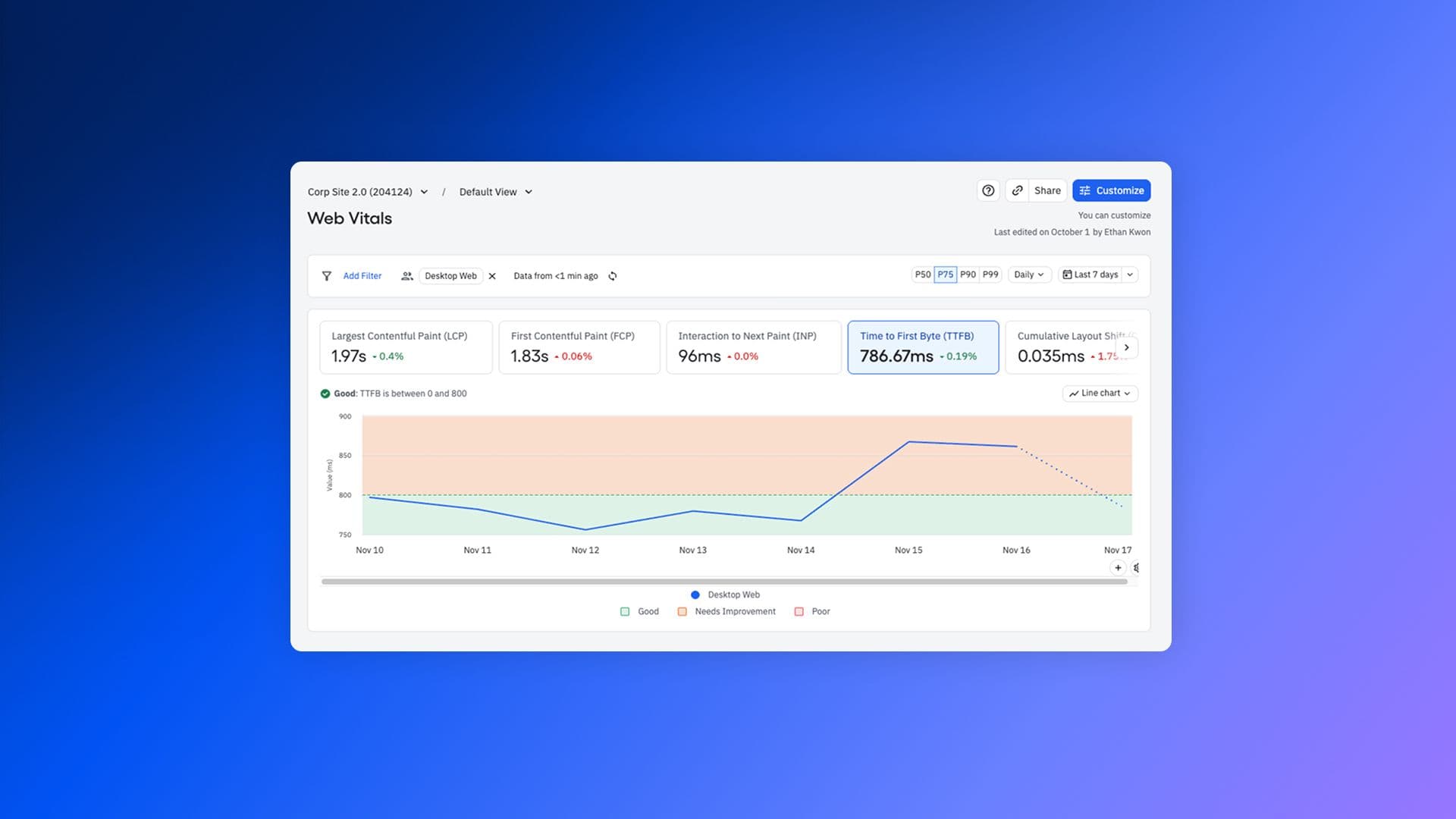
Web teams: get ready to defibrillate your vitals. Starting today, you can now track Web Vitals in Amplitude with auto-collection in our browser SDK and a purpose-built marketing hub to visualize them.

Web Vitals are an important way to get performance and SEO signals for your site, but those scores aren’t as meaningful if they’re siloed off on their own. By bringing Web Vitals into Amplitude, you’ll be able to track, query, segment, and compare them with the rest of your behavioral data.

What are Web Vitals?

Originally defined by Google, Web Vitals are a set of standardized performance metrics that serve both as quality signals for your website and as ranking factors that Google uses for search engine optimization. Tracking them helps you understand if your site is able to deliver the great user experience you want it to.

Amplitude now captures the Core Web Vitals along with a couple of others:

  • Largest Contentful Paint (LCP): How long it takes for the largest content block on the screen to render when a user navigates to a page.
  • First Contentful Paint (FCP): How long it takes for the first content block on the screen to render.
  • Time to First Byte (TTFB): The time between when a user starts to navigate to a page and when the first byte of a response begins to arrive.
  • Cumulative Layout Shift (CLS): A measure of how much users are affected by unexpected layout shifts in page content.
  • Interaction to Next Paint (INP): The maximum time between an interaction (tap, mouse click, keyboard interaction) and the next paint.

Why measure Web Vitals in Amplitude?

While it’s true that web teams can already get their Web Vitals with tools like PageSpeed Insights, those metrics exist in a vacuum. Measuring in Amplitude gives you a seamless way to take action on your quality signals and optimize your site’s performance and SEO rankings.

1) Filter Web Vitals scores by segment: Filtering by groupings like connection type, device type, country of origin, and feature flags helps you understand your scores more deeply.
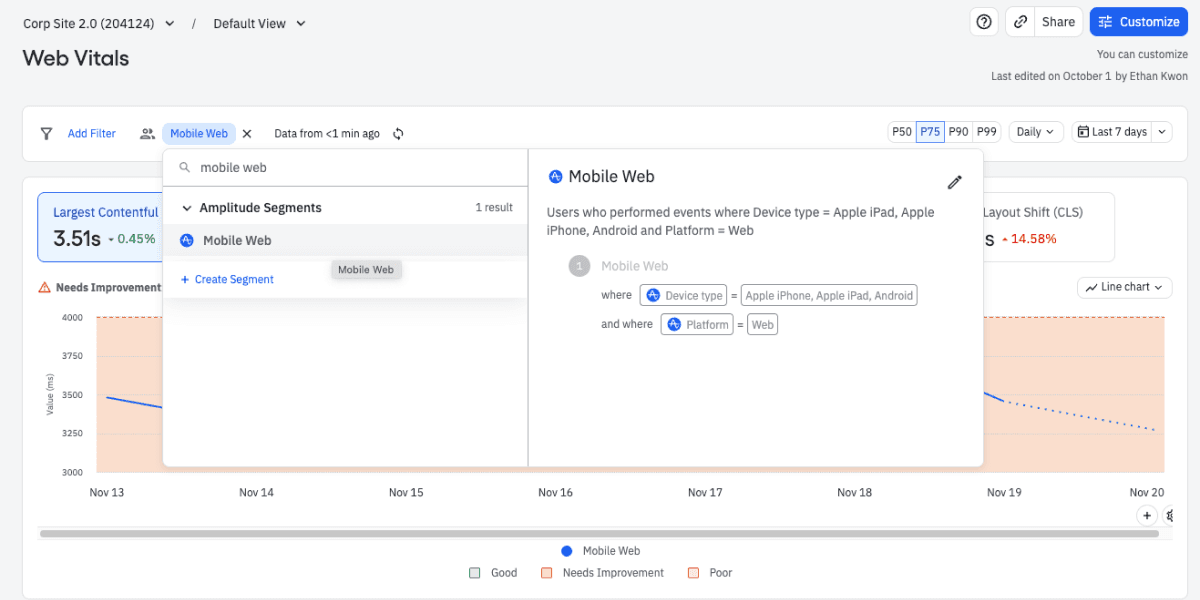
Web vitals hub, showing mobile web segments

2) Connect Web Vitals to individual user journeys. You can look at the user journey of users who have poor Web Vitals scores and see how it affected their habits.
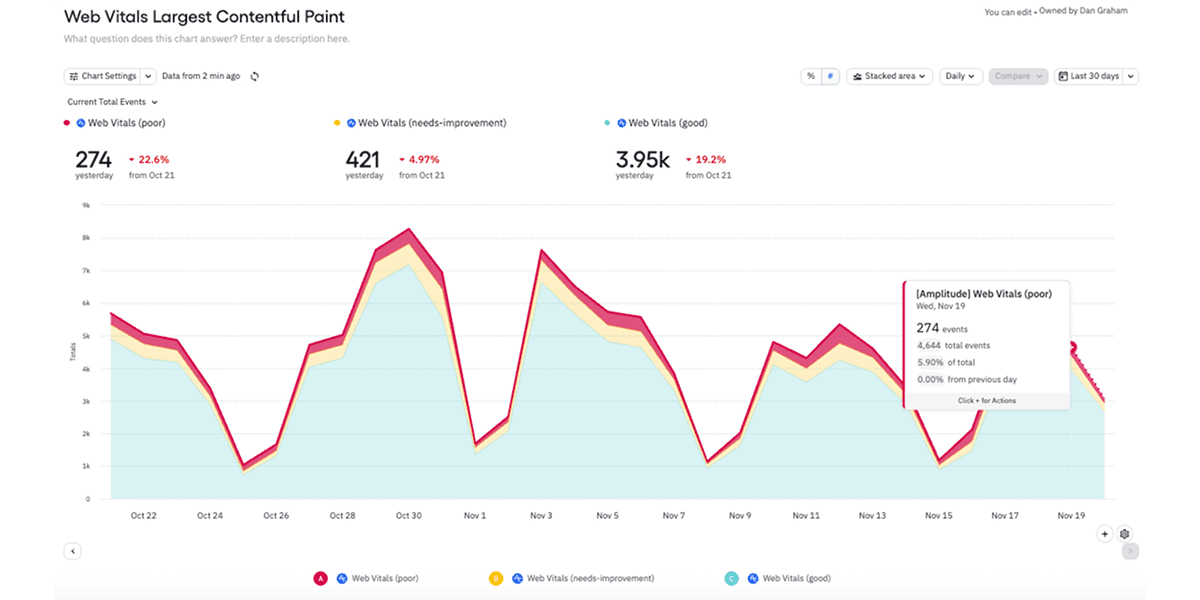
LCP score grouped by performance (good, needs improvement, poor)

LCP score grouped by performance (good, needs improvement, poor)

3) Troubleshoot poor-performing web vitals scores. By connecting poor web vitals scores to Amplitude Session Replay, you can gain better insights as to what’s causing user experience problems.
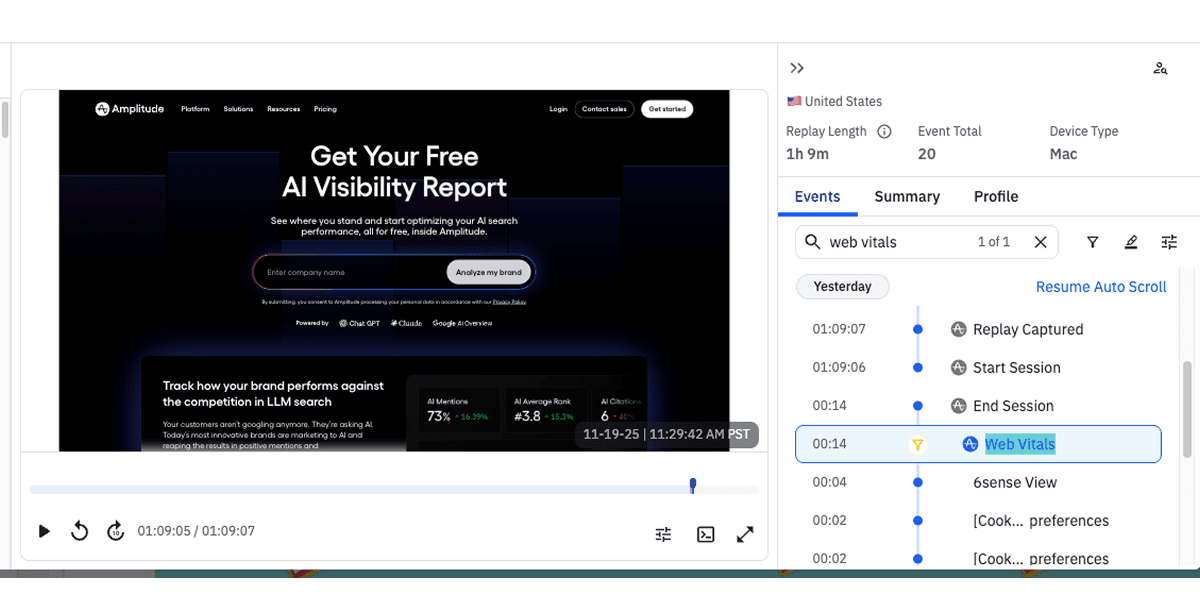
Session replay log showing the Web Vitals event coming through

In fact, here at Amplitude, we’ve already been using our Web Vitals feature internally to improve web performance. Tracking these scores helped with our recent homepage redesign, and we continue to monitor vitals across our site to deliver better user experiences to our visitors.

How do you use Web Vitals in Amplitude?

The setup required to start capturing Web Vitals is very easy and is included in all Amplitude plans:

  1. Set up the Browser SDK on your website if you haven’t already (minimum version 2.30.1).
  2. In your configuration, set “autocapture.webVitals=true” (or just set “autocapture=true” to enable all of our great autocapture functionalities).

Once you’ve deployed the SDK, you’ll automatically see an event coming through called “[Amplitude] Web Vitals.” This event captures all of the Web Vitals metrics.

To view your vitals, log in to Amplitude and visit Marketing Analytics > Web Vitals. From that hub, there are lots of ways to dig in:

  • A line chart shows your website’s Web Vitals performance over time.
  • Choose individual Web Vitals and percentile scores to explore more.
  • Filter by user segments like device or region.
  • Filter by URL to see which individual pages are performing the best or worst.

For a more detailed breakdown, see our docs.

Revitalize your web performance

Capturing Web Vitals has been easy for web teams to do, but getting the context for those scores and being able to act on that context hasn’t.

By capturing Web Vitals through Amplitude, we aim to change that. Segmenting, querying, and pairing your scores with session replays will give you greater insights into how your website performs, how usable it is, and how to go about delivering a high-quality web experience to your customers. Try it out today, and let’s build a better web together.

How is your website performing? Find out easier than ever with a free Amplitude account and our browser SDK. Enable autocapture for Web Vitals to start understanding how well your website is performing so you can deliver a great user experience for your customers.

About the author
Dan Graham

Dan Graham

Senior Software Engineer, Amplitude

More from Dan

Dan is a Senior Software Engineer on the Developer Experience team, specializing in development of Amplitude's Browser SDK.

More from Dan
Topics

Analytics

Marketing Analytics

Recommended Reading

article card image
Read 
Insights
Making Diagnostic Analytics Trustworthy

Dec 18, 2025

7 min read

article card image
Read 
Insights
The Product Benchmarks Every Retail and Ecommerce Company Should Know

Dec 18, 2025

5 min read

article card image
Read 
Insights
Why Context Engineering Matters More Than Prompt Engineering

Dec 16, 2025

9 min read

article card image
Read 
Insights
The Product Benchmarks Every Financial Services Company Should Know

Dec 16, 2025

5 min read

Platform
  • Product Analytics
  • Feature Experimentation
  • Feature Management
  • Web Analytics
  • Web Experimentation
  • Session Replay
  • Activation
  • Guides and Surveys
  • AI Agents
  • AI Visibility
  • AI Feedback
  • Amplitude MCP
Compare us
  • Adobe
  • Google Analytics
  • Mixpanel
  • Heap
  • Optimizely
  • Fullstory
  • Pendo
Resources
  • Resource Library
  • Blog
  • Product Updates
  • Amp Champs
  • Amplitude Academy
  • Events
  • Glossary
Partners & Support
  • Contact Us
  • Customer Help Center
  • Community
  • Developer Docs
  • Find a Partner
  • Become an affiliate
Company
  • About Us
  • Careers
  • Press & News
  • Investor Relations
  • Diversity, Equity & Inclusion
Terms of ServicePrivacy NoticeAcceptable Use PolicyLegal
EnglishJapanese (日本語)Korean (한국어)Español (Spain)Português (Brasil)Português (Portugal)FrançaisDeutsch
© 2025 Amplitude, Inc. All rights reserved. Amplitude is a registered trademark of Amplitude, Inc.
Blog
InsightsProductCompanyCustomers
Topics

101

AI

APJ

Acquisition

Adobe Analytics

Amplify

Amplitude Academy

Amplitude Activation

Amplitude Analytics

Amplitude Audiences

Amplitude Community

Amplitude Feature Experimentation

Amplitude Guides and Surveys

Amplitude Heatmaps

Amplitude Made Easy

Amplitude Session Replay

Amplitude Web Experimentation

Amplitude on Amplitude

Analytics

B2B SaaS

Behavioral Analytics

Benchmarks

Churn Analysis

Cohort Analysis

Collaboration

Consolidation

Conversion

Customer Experience

Customer Lifetime Value

DEI

Data

Data Governance

Data Management

Data Tables

Digital Experience Maturity

Digital Native

Digital Transformer

EMEA

Ecommerce

Employee Resource Group

Engagement

Event Tracking

Experimentation

Feature Adoption

Financial Services

Funnel Analysis

Getting Started

Google Analytics

Growth

Healthcare

How I Amplitude

Implementation

Integration

LATAM

Life at Amplitude

MCP

Machine Learning

Marketing Analytics

Media and Entertainment

Metrics

Modern Data Series

Monetization

Next Gen Builders

North Star Metric

Partnerships

Personalization

Pioneer Awards

Privacy

Product 50

Product Analytics

Product Design

Product Management

Product Releases

Product Strategy

Product-Led Growth

Recap

Retention

Startup

Tech Stack

The Ampys

Warehouse-native Amplitude